To change your Site Title and Favicon, log in to your WordPress Admin Dashboard and follow the steps below:
- Go to Dashboard.
- Navigate to Appearance → Customize.
- Click on Site Identity.
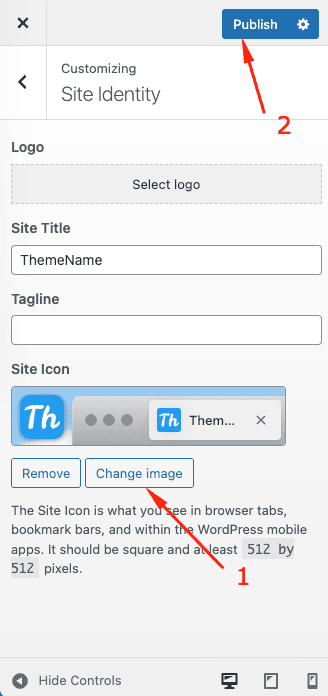
Under the Site Identity section, you will see options to edit the Site Title, Tagline, and Site Icon (Favicon).
To change the Site Title:
- Enter your desired title in the Site Title field.
- You can also add or edit the Tagline if needed.
To change the Favicon (Site Icon):
- Under Site Icon, click on Change image.
- Upload or select an image from the media library.
- The recommended image size is 512 x 512 pixels.
Once you have made your changes, click the Publish button at the top to save.
Your new Site Title and Favicon will now be updated and visible across your website and browser tabs.