Skip to content
Documentation

Aior

⌘K
  • Getting Started
    • Requirements
    • What’s Included
  • WordPress Installation
  • Installing the theme
    • Using Theme Uploader
    • Using FTP Clients
    • Updating the theme
    • Installing required plugins
  • Importing Demo Contents
    • Manual Setup
    • One Click Demo Setup
  • Basic Setting
    • Home and Blog Page Setting
    • Site Title and Favicon
    • Change Logo
    • Menu Customization
  • Elementor Settings
  • Theme Customization
    • Color
    • Typography
    • Back to Top
    • Preloader
    • Header Setup
    • Mobile Menu Logo
    • Footer Setup
    • Social Media Setup
    • Breadcumb Setup
    • Blog or News Page Setup
    • Page Setup
    • WooCommerce Page Setup
    • 404 Page Setup
    • Mail Chimp Setup
    • Contact Form Setup with Mail Submit
    • Custom CSS Added
  • Item Support
  • Item Rate
  1. Home
  2. Aior
  3. Theme Customization
  4. Page Setup

Page Setup

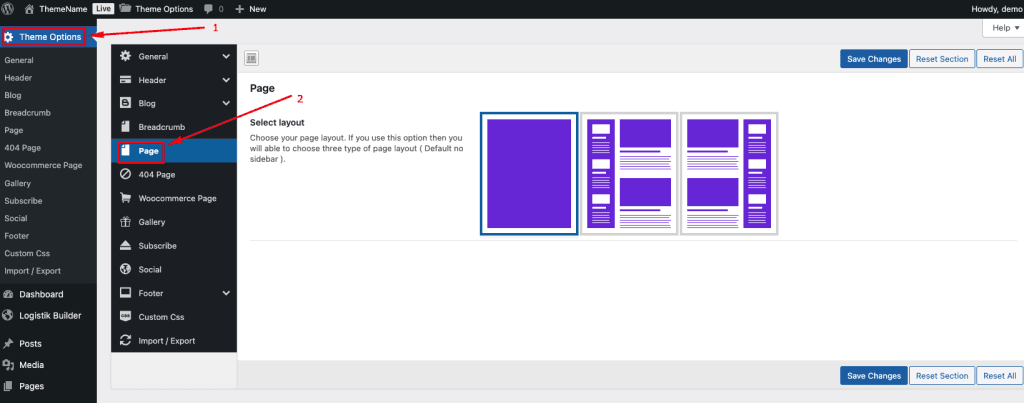
To change your Page Setup, log in to your WordPress Admin Dashboard and follow the steps below:

  1. Go to Dashboard.
  2. Navigate to Aior Options → Pages
  3. Select your pages layout
  4. Save Changes.

Doc navigation

← Blog or News Page SetupWooCommerce Page Setup →
Still stuck? How can we help?
Updated on January 27, 2026
Was this article helpful to you? No Yes

How can we help?

All rights reserved